Step control
About time on analysis
In the analysis of FrontISTR, following definitions of "time" are used:
- Current time : Total time from start of analysis.
- Step time : Time from start in each of step.
- Time span : Duration of time for each step.
- Relative time : Ratio of "Step time" to "Time span".
- Time increment : Increment from "Current time" to "time at which the equilibrium is attained".
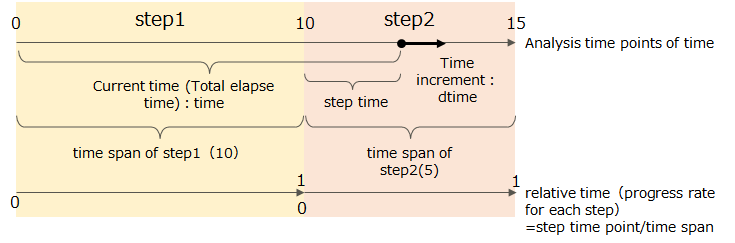
Figure 4.7.1 Definition of terms for analysis time
Control for static analysis
A static analysis in FrontISTR consists of one or more (continuous) analysis steps. A set of boundary conditions is given in each step and the analysis step is solved with incremental solving strategy which is mentioned previously.
Below, iteration of analysis is called "step loop", and incremental method is called "sub-step loop".
Incremental control of static analysis could be chosen from the following solution.
- Analyze with fixed time increments. If convergence fails, the calculation will be stopped immediately.
- Automatic time increment and cutback. Depending on the convergence, change the increment width. If the calculation fails, recalculate after decreasing the increment width.
Automatic time increment and cut-back
Flow is automatic time increment and cut-back is as follows(Figure 4.7.2).
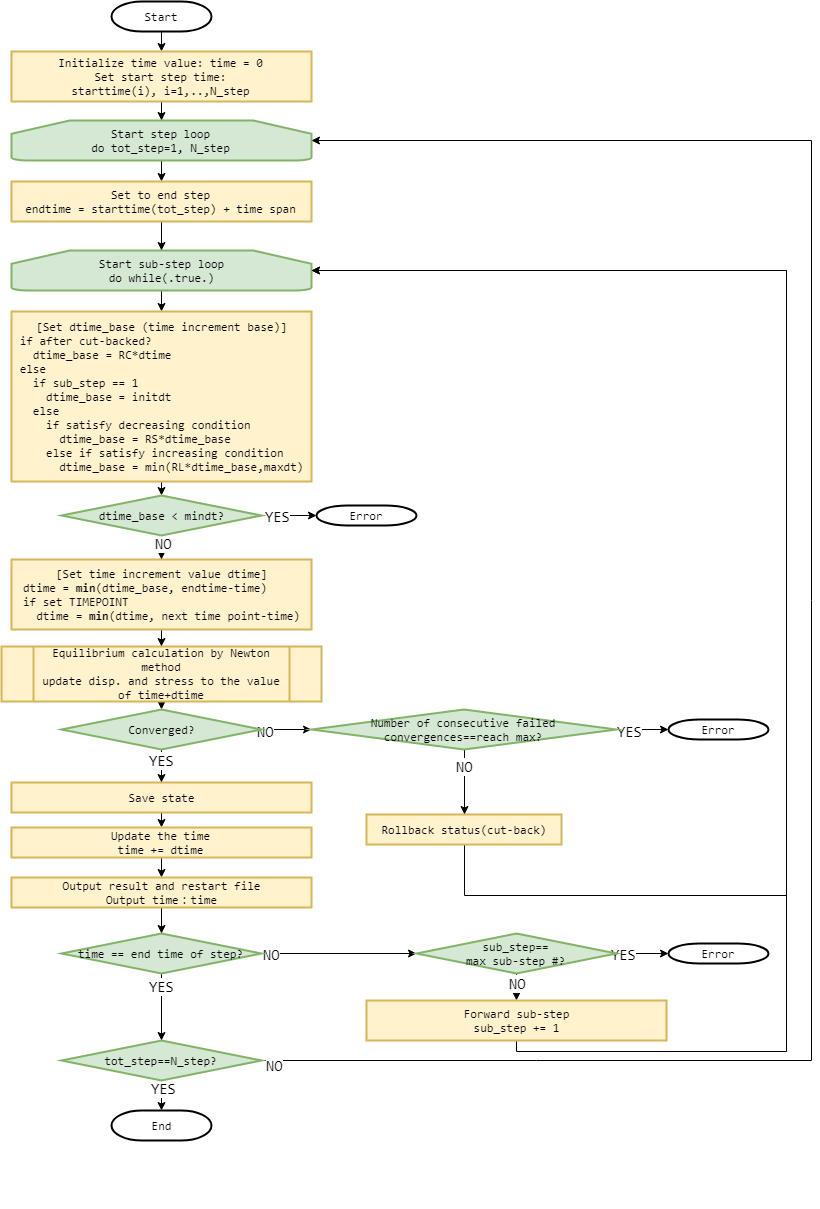
Figure 4.7.2 Flow of automatic time increment and cut-back
Overview of program flows is as follows,
- Loop from step 1 to final step(N_step):
- The time increment base
dtime_baseis determined from the currentdtime_baseand the convergence status in the previous sub-step. First time usesinitdt. - The actual
dtimeis determined by "step end or the remaining time until the nearest specified output time and smaller ofdtime_base. - Try calculation of equilibrium of forces at time+dtime.
- If converge, the time is forward by
dtime, when it fails, restore time and return to 2. - Step ends when time reaches step end time.
If any of the following cases occurs during the analysis, the nonlinear static analysis is considered to have failed and the program terminates with error:
- The number of sub-steps reaches the upper limit before
timereaches the step end time. - The time increment
dtime_basefalls below the time increment lower limitmindt. - Analysis fails to converge consecutively for specified number (
N_C) of times.
Adjust time increment baseline dtime_base
The first dtime_base of the step is set to the value of the specified initial time increment initdt.
Otherwise, it is set as follows according to the convergence status of the previous sub-step.
- If analysis failed to converge and a cutback is made, the value
dtime_basemultiplied byR_C(reduction ratio of cutback). - When be a successful to converge
- Corresponds to the decrease condition : the value of
dtime_basemultiplied byR_S(decrease ratio). - In the case of an increase condition, not a decrease condition : the smaller value of 'dtime_base' multiplied by 'R_L' (increase ratio) and the time increment upper limit
maxdt. - If neither :
dtime_basedose not change.
- Corresponds to the decrease condition : the value of
Increase / decrease conditions
When the automatic time incremental adjustment function determines to increase/decrease time increment, the following variables are used:
- N_max : Maximum number of Newton iterations of previous substep.
- N_sum : Total number of Newton iterations in the previous substep(Same as
N_max, when there is no repeated contact). - N_cont : Number of contact iterations in previous substep.
Time increment is decreased when both of the following are met:
- One of
N_max,N_sumorN_contexceeds the respective thresholdNS_max,NS_sumorNS_cont. - When the above conditions are satisfied by a substep that continues
N_Stimes or more.
Time increment is increased when both of the following are met:
N_max,N_sumandN_contare all within their respective thresholdNL_max,NL_sumandNL_cont.- The above condition is met by substep that continues more than
N_Ltimes.
Specify calculation time and output time
With automatic time increments, the increments change with the convergence state, so it is not possible to determine in advance when to run the equilibrium calculation and result output. If this is inconvenient, you can specify a list of output times to perform the equilibrium calculation and result output at the desired time.
For steps that include a list of output times, dtime is adjusted so that the calculation is always performed at specified time.
Usage of function of automatic time increments and cut-back
Settings related to this function are made in the analysis control file.
The function of automatic time increment and cut-back are enabled specified by INC_TYPE=AUTO on the !STEP card.
For parameters that adjust the time increment, define !AUTOINC_PARAM and specify it in each step using the !STEP, AUTOINCPARAM'.
If not specified, the default value of!AUTOINC_PARAM' is used.
The output time is specified for each step with the !STEP, TIMEPOINTS parameter after defining the time list with !TIME_POINTS.
Example
Enable automatic incremental adjustment and set initial time increment 0.01, step duration 2.5, time increment lower limit 1E-5, time increment upper limit 0.3, maximum substep number to 200.
Specify AP1 for the auto-increment parameter set and 1.5, 2.7 and 3.9 for the output time.
    !AUTOINC_PARAM, NAME=AP1
    0.25, 10, 50, 10, 1
    1.25,  1,  1,  1, 2
    0.25,  5
    !TIME_POINTS, TIME=TOTAL, TIME=,NAME=TP1
    1.5
    2.7
    3.9
    !STEP, INC_TYPE=AUTO, SUBSTEPS=200, AUTOINCPARAM=AP1, TIMEPOINTS=TP1
    0.01, 2.5, 1E-5, 0.3
Distribution of the prescribed displacements over substeps
When a step is solved in several substeps, AMPLITUDE of !STEP selects how the prescribed displacements given by !BOUNDARY are distributed over them. It also takes effect when AMP is given on !BOUNDARY.
The distribution follows a time function. When AMP is given on !BOUNDARY, that amplitude is the time function. Otherwise the load factor of the step is the time function: the amplitude given by AMP of !STEP if specified, and a value proportional to the time elapsed within the step (0 at the start of the step and 1 at its end) if not.
| Value | How the prescribed displacements are applied | When to use |
|---|---|---|
RAMP |
Increased in proportion to the value of the time function | To ramp the displacement up so that the nonlinear iteration of each substep converges |
STEP |
Applied in full at the substep where the value of the time function is zero (normally the first substep of the step), and not increased afterwards | To hold the displacement and follow the time-dependent response of creep or visco-elasticity |
With STEP this applies equally when AMP is given on !BOUNDARY, so the shape of the amplitude is not reflected. Use RAMP to give the prescribed displacements along the time history.
See !STEP for the format and the defaults.
Control for dynamic analysis
In this development code, dynamic analysis direct time integration method consists of one analysis step.
Incremental control for dynamic analysis is only fixed increments and automatic time increments are not available.